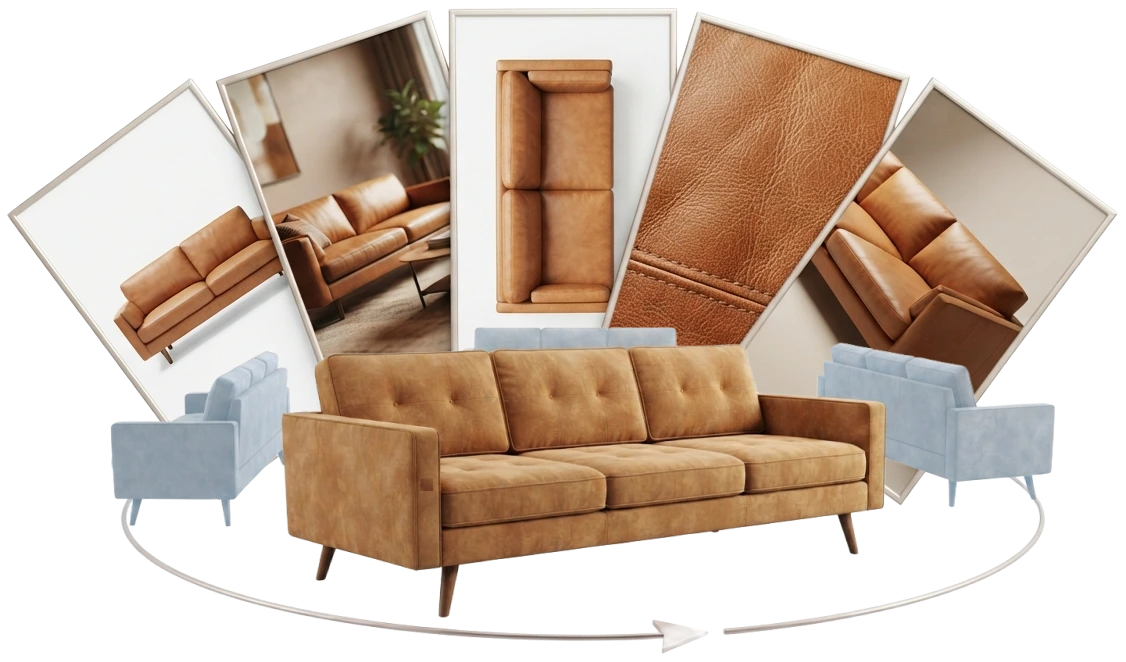
Off-the-shelf AI image models are very good at one picture. We mean the widely available tools that create or edit a picture from a prompt, such as Google’s Gemini (Nano Banana) and OpenAI’s GPT Image. Give one a photo of your sofa and a sentence, and in about twenty seconds you have the sofa in sage velvet, in a bright studio, with a soft shadow under it. For a campaign idea or a mood board, that is everything you need.
A variant range asks for something else. Every picture in it makes the same promise: the only thing that changes from one image to the next is the thing the customer chose. Same sofa, same arms, same legs, same camera, same light, a different fabric. An off-the-shelf model cannot keep that promise across hundreds of pictures, because it draws each one from scratch.
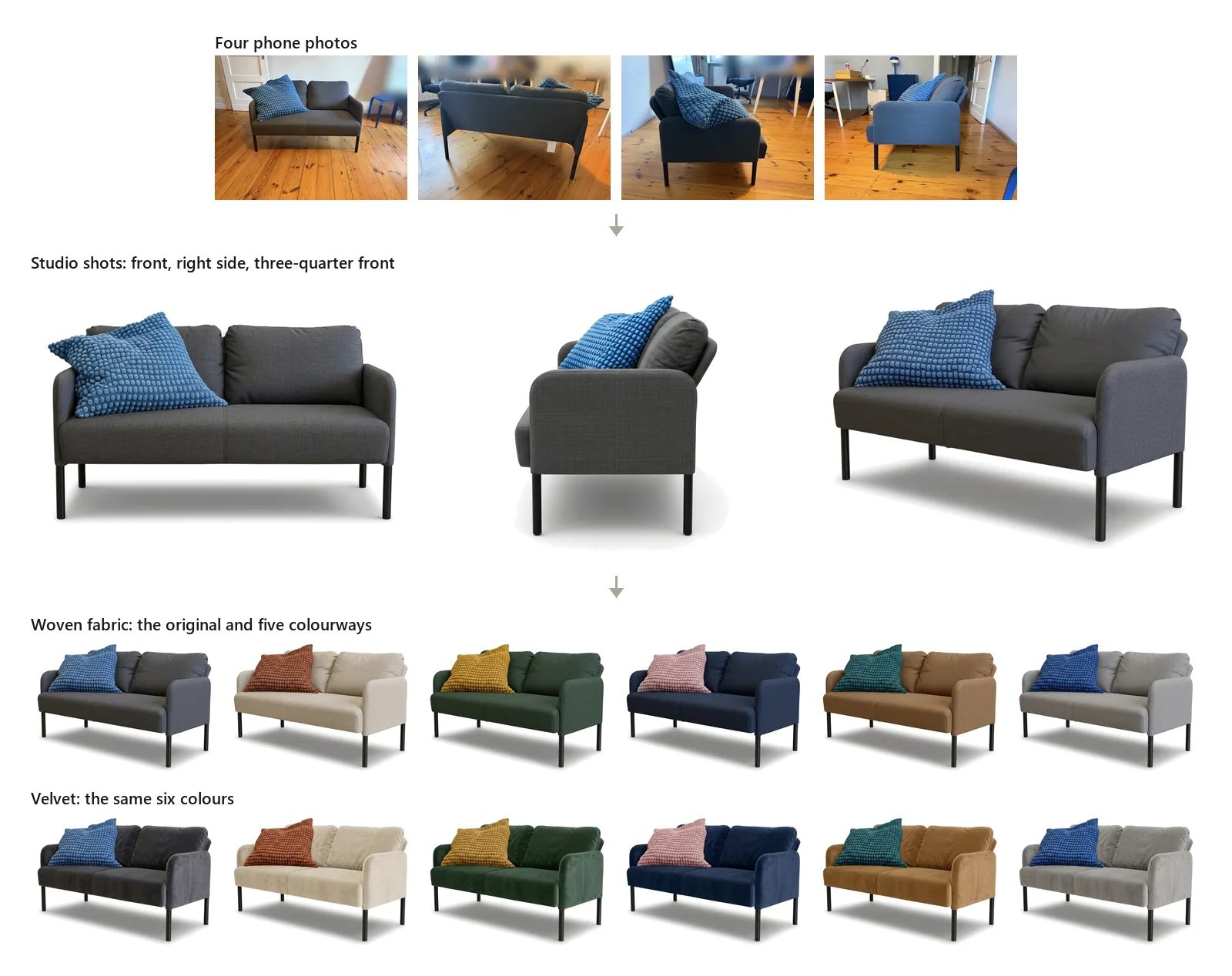
What a variant image has to do
A buyer choosing a fabric clicks through the swatches and watches the sofa change. They read every difference between two pictures as a difference between two products. If the arm is a little rounder in the green one, or the seat a little deeper in the grey one, the buyer notices, even without being able to say what changed, and the range starts to look careless.
The picture is also a description of what you will deliver. A seam that appears in the photo and never arrives on the sofa is a complaint waiting to happen, and on a made-to-order piece it can become a return.
So a variant set holds three things still while one thing moves:
- The shape: proportions, seams, piping, legs, every detail of the product you make.
- The camera: angle, lens, height and framing, the same for every product and every fabric.
- The finish: the same light, background and shadow, so the range looks like one range.
Only the material changes.
What we saw when we asked an off-the-shelf model for a set
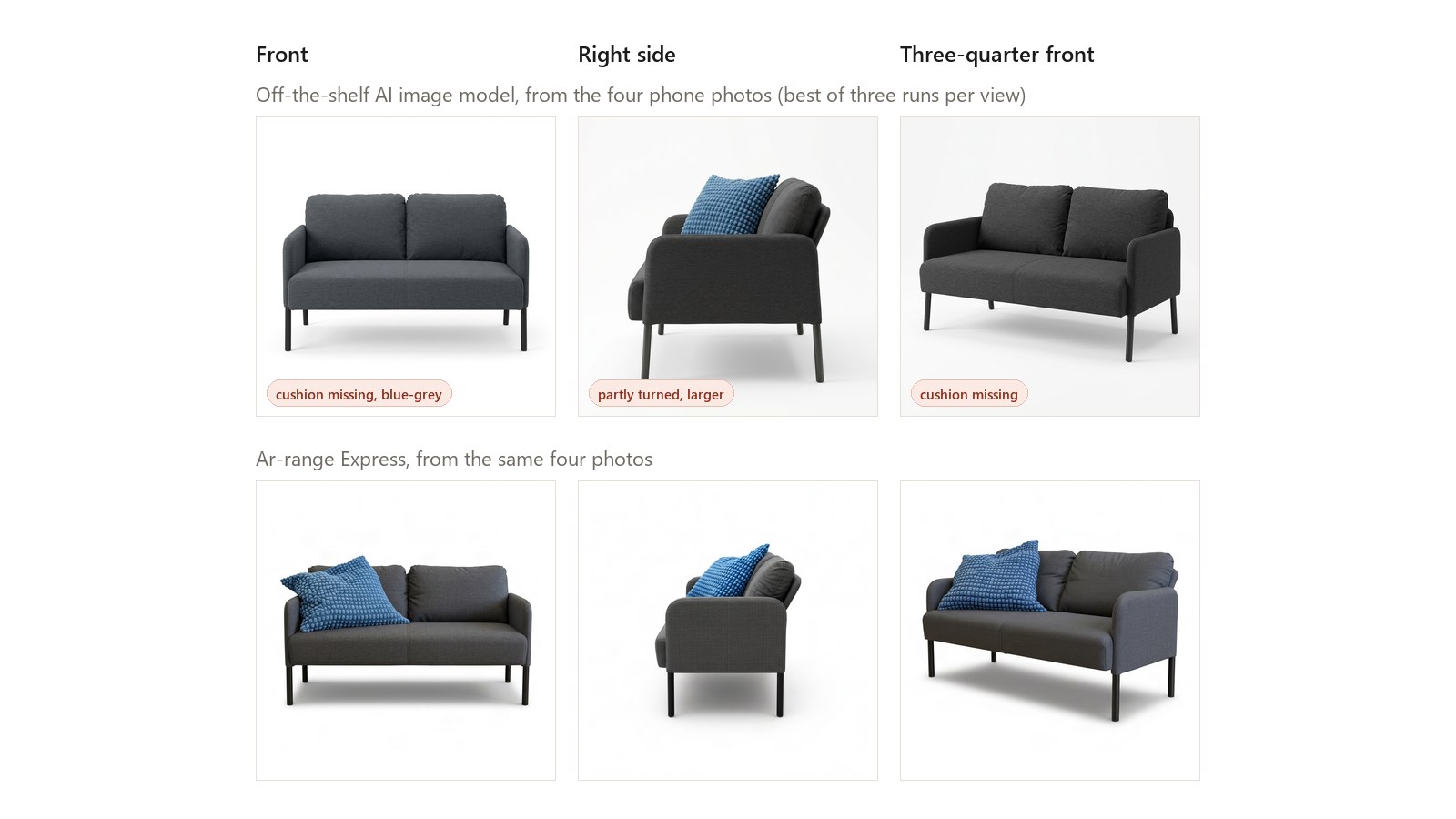
We tested this ourselves while building Ar-range Express, our service that turns four phone photos of a chair or sofa into packshots, also called silo shots. We did what a store owner would do. We took the four phone photos of a rocking chair and of a two-seater sofa, attached them to one of the best-known of these models, and asked for “a studio product photo on a pure white background, soft even light, whole product in frame”: once for the front view, once for the right side and once for a three-quarter front view. We ran each request three times, 18 pictures for 77 cents.
On its own, every picture looks like a studio shot. As a set, they disagree with each other and with the product:
- Parts come and go. The sofa’s blue bobble cushion is missing from six of its nine pictures: there in some views, gone in others.
- The chair turns the wrong way. Three of its six side and three-quarter pictures show it from the other side.
- Proportions shift. From the front, the chair is 0.70 times as wide as it is tall; the model drew it at 0.57 to 0.64. The sofa is 1.68 times as wide as it is tall; the model drew it at 1.49 to 1.56.
- The framing and the view move. The same view of the same product fills a different share of the frame on each run. The sofa’s right-side pictures are partly turned towards the camera, and they fill far more of the frame than its front views.
- The colour moves. The chair’s warm grey comes out neutral or cool, and one front view of the charcoal sofa came out blue-grey.
- The background moves. Eight of the 18 backgrounds are light grey, a shade off the pure white we asked for, and every picture has a soft shadow nobody asked for.
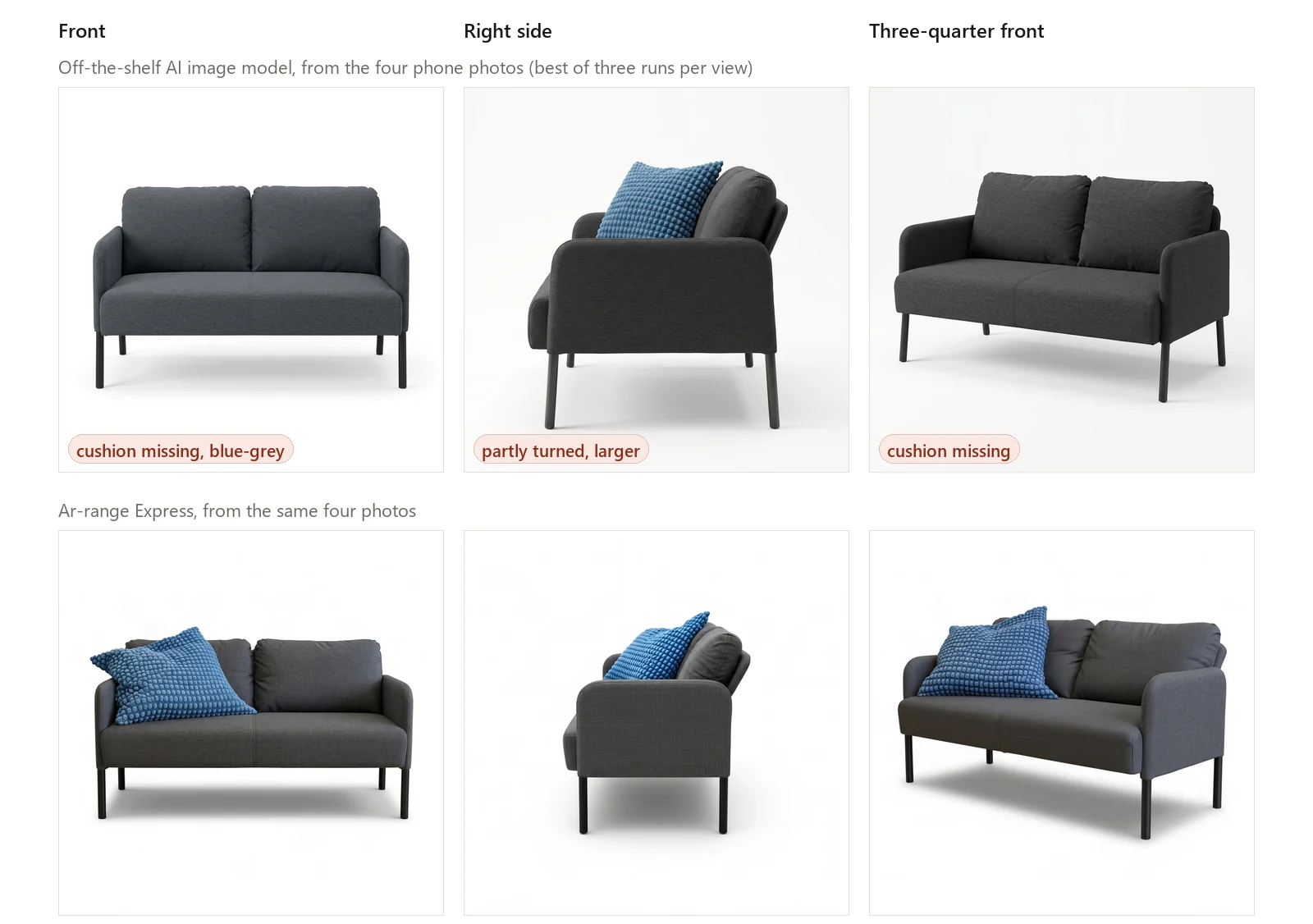
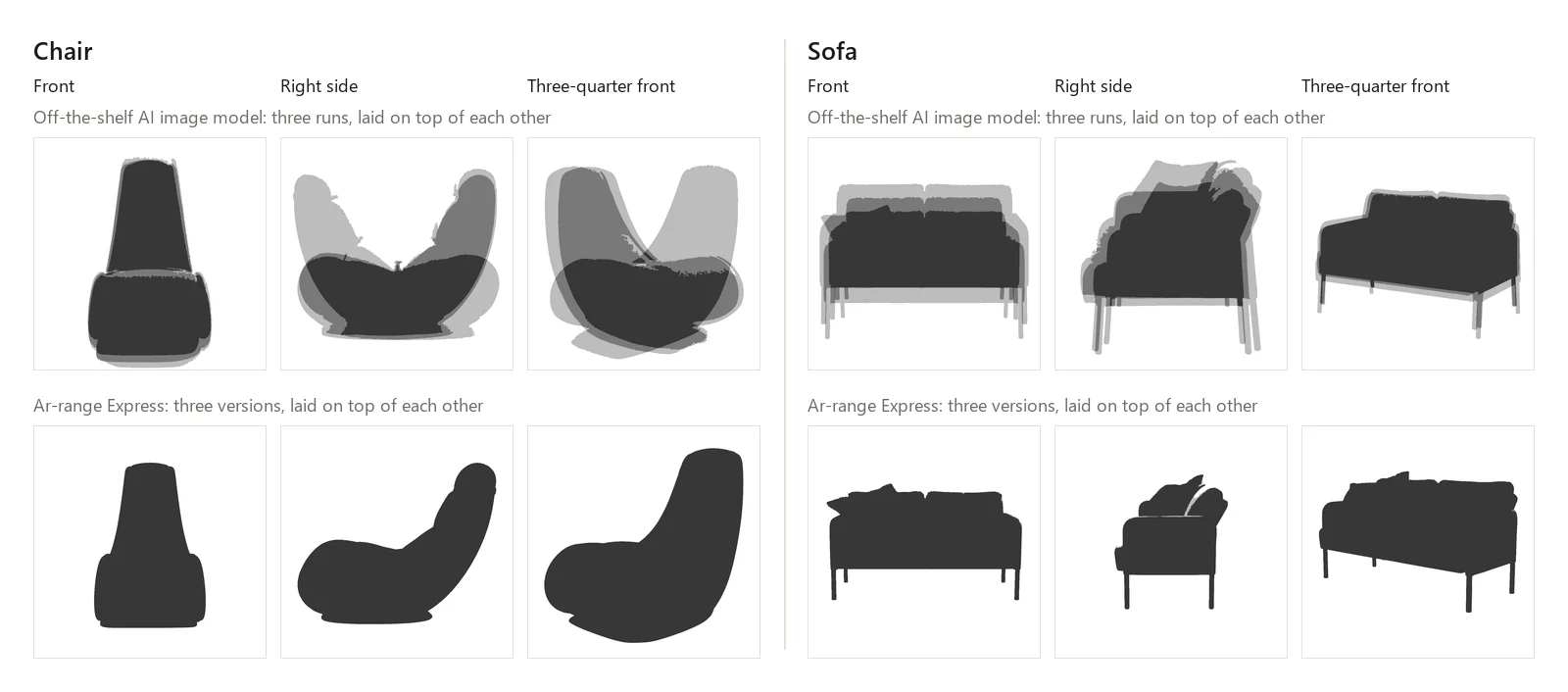
Laid over the outline of the 3D shape we made from the same photos, seen from the same camera, the model’s pictures overlap it by 0.42 to 0.90, where 1.00 would be a perfect match (how we measured). The Express pictures of the same views overlap by 0.96 to 0.99.
The difference is easiest to see with the three versions of each view stacked on top of each other. One at a time, the model’s pictures look as good as anything Express makes. Stacked, they come apart.
Giving the model more to go on helps less than you would expect. In an earlier test we added two guide images of the chair’s front view, and it still followed the viewpoint of the phone photo, with an outline overlap of 0.70.
Some failures only show to someone who knows the product. In our tests an off-the-shelf model added puckered creases along the backrest seams of the chair in one picture and a diagonal seam across its side panel in another. Both look entirely plausible, so whoever checks the pictures has to know the product.
Why it happens
An off-the-shelf model has no record of your product. It has your prompt, the pictures you attach, and what it learned from millions of other images. From those it draws the most likely picture that fits. Where your photos leave a detail open, such as the back of a cushion, the end of a seam or the height of a leg, it fills the gap with what chairs usually look like. Nothing in four photos says whether a loose cushion belongs to the product, so some of our pictures kept it and some dropped it.
Each picture is a new drawing. Nothing carries over from the green sofa to the grey one except what you put in the prompt again. The model makes slightly different guesses every time, so the shape drifts from picture to picture, and the drift is different for every fabric and every angle. Most of the time the swap looks right. A catalogue needs it right every time, and you cannot tell in advance which pictures will be the exceptions.
Colour drifts the same way. The fabric colour in an AI picture is the model’s reading of a swatch photo or a hex code, under light the model chooses. When we tried off-the-shelf models on chenille upholstery fabrics, the pictures were beautiful one at a time and could not hold one colour across a range. They ended up as reference for conventional rendering, which turned out faster, more reliable and cheaper.
Time adds one more kind of drift. A range lives for years, and new fabrics join it every season. Off-the-shelf models change versions often, so next year’s fabrics may be drawn by a different version from this year’s. A 3D model renders a new fabric with the same camera and light whenever you add it.
The checking is the real cost
A picture from an off-the-shelf model costs a few cents through an API (about four cents per image in our tests), or nothing extra inside a subscription you already pay for. That is the number everyone quotes, and it is the smallest part of the bill.
Count the range instead. Thirty models in forty fabrics from five angles is 6,000 pictures. Because each picture can go wrong in its own way, someone has to open every one of them and compare it with the real product: shape, seams, legs, colour, framing. In our set of 18, half the chair’s side and three-quarter pictures faced the wrong way, and two thirds of the sofa’s lost a cushion. Whatever the rate turns out to be on your products, the only way to find the flawed pictures is to look at all of them. The bad ones go back for another try, and the new versions need checking too.
The person doing that has to know the product well enough to see a seam that should not be there, which usually means a product manager or a designer. Their hours are the scarce part of any catalogue project, and a range of AI pictures spends them on inspection.
Where off-the-shelf models work well
An off-the-shelf model earns its place wherever one person looks at each picture and the picture only has to look right.
- Mood boards and campaign ideas. Whether a sofa reads better in a loft or a cottage, or which colour story suits the autumn campaign. Nobody orders from a mood board.
- Choosing which colourways to sample. Before you commission swatches or a production run, a quick recolour of one studio shot shows how five candidate colours sit on the real silhouette. In our tests an off-the-shelf model recoloured finished studio shots twenty times and kept the outline every time, with every hue on target. Treat the result as a colour study: pale colours on a lit, shaded seat measure darker than the hex code you asked for, and a hex code says nothing about weave or sheen.
- A single hero image for a post or an ad, where a person checks that one picture against the product before it goes out.
- The finishing step inside a controlled process. Once a 3D shape has fixed the outline and a fixed camera has fixed the angle and framing, there is little left for an image model to decide, and it does what it is very good at: texture, surface and the studio finish. That is how Express works. Every view comes in three versions, and a person picks the one closest to the product.
The pattern behind all four: an off-the-shelf model works when the picture is an idea, or when something else has already decided what the product looks like. It fails when the picture is the record of the product and nobody will look at all of them.
What to use for the range
Match the method to the number of pictures and to how close each one has to be to the product you sell.
- An off-the-shelf AI image model from a subscription you already have for a quick campaign idea or a mood board, where the picture only has to look right.
- Ar-range Express for the long tail of your catalogue. Four phone photos of each chair, armchair or sofa (how to take them) come back as studio shots from the same five views, with the outline taken from a 3D shape made from your photos, so the range looks like one range.
- Variant Visuals for hero products, every fabric and every configurator. Each model is built by hand from your CAD files or the physical piece, for the closest match to the product you sell.
If you use an off-the-shelf model for variants anyway
Give it as little to decide as possible.
- Fix the shape and the camera first. Start every picture from the same approved studio shot or 3D view, and let the model change the material only.
- Change one thing per picture. A new fabric or a new room, one at a time.
- Make several versions of each picture and pick one. A flaw then costs a choice, and a retry becomes the exception.
- Check every picture against the physical product, and budget the hours before you start.
- Keep the inputs: the base image, the prompt and the model version, so next season’s fabrics can be made the same way for as long as that version exists.
If you would like to see your own range done the Express way, or want to know which of the three fits your catalogue, talk to our team.
How we measured the overlap
Every overlap figure in this post compares two outlines of the same view. One is the product in the picture: every pixel that differs clearly from the background colour at the picture’s edges, minus the light grey shadow on the floor. The other is the outline of the 3D shape we made from the same four phone photos, seen from the same camera. The score is the area the two outlines share divided by the area they cover together (intersection over union), so 1.00 means identical outlines. All of it is pixel arithmetic on pictures 1,024 pixels square: 18 from the off-the-shelf model and the 6 Express pictures shown above.
- It counts size and position as well as shape, because a variant set needs the same framing in every picture. With each outline scaled to the same size, the off-the-shelf model’s pictures score 0.48 to 0.92 and the Express pictures 0.93 to 0.99.
- A picture from the wrong side scores about 0.5. Mirrored back, the chair’s three wrong-way pictures reach 0.81 to 0.92.
- The Express pictures are made from that 3D shape, so their score shows how closely they follow it. It cannot show whether the shape itself matches the product. The stacked silhouettes above use no 3D shape at all: each outline there is cut from its own picture, and they show the same difference.
- The proportions we call the chair’s and the sofa’s (0.70 and 1.68 wide to tall) are measured on the same 3D shape’s outline.
- The 0.70 overlap comes from an earlier test of the chair’s front view, where the model had the phone photos and two guide images, scored the same way.