
Why Shopify Product Variants Still Break Down for Furniture Brands
I often see furniture brands fall into the same trap. They start with a clean Shopify setup-a few sofas, some fabrics, a handful of finishes. Then, they scale. They add “just a few more fabrics,” and suddenly the catalog begins to wobble. Load times spike. Options vanish. The theme breaks.
This isn’t because Shopify performs poorly; it’s because its core architecture was designed for linear catalogs (like T-shirts or sneakers), not the multidimensional complexity of configurable furniture. Even with Shopify’s 2024/2025 infrastructure updates, the platform’s “Flat Variant Model” creates bottlenecks that can paralyze a growing brand.
The 250-Variant Wall: Why “More” Isn’t Always “Better”
Shopify recently made headlines by raising its variant limit from 100 to 2,048. While this looks good on a feature sheet, the practical reality for a furniture brand is much thornier.
- The Liquid Bottleneck: Shopify’s native templating language, Liquid, can only “see” the first 250 variants of a product. If your custom sofa has 500 combinations, any variants beyond the 250th won’t appear in standard dropdowns.
- The Theme Gap: To access all 2,048 variants, your store must use the Storefront API and custom JavaScript. Most standard themes aren’t built for this, leading to broken selectors and “ghost” options that customers can’t select.
- The Media Ceiling: Shopify limits a single product to 250 media files. If you offer a modular sectional with 1,000 fabric/leg combinations, you physically cannot upload unique photos for 75% of your inventory.
The Hidden Cost of “Pseudo-Products” and Workarounds
When furniture brands hit these walls, they usually turn to two common - but fragile- workarounds:
- Splitting Products: Breaking one sofa into five “pseudo-products” based on fabric type. This fragments your SEO, confuses customers who want to compare options in one place, and makes inventory management a nightmare.
- Third-Party Option Apps: These inject code to bypass the 3-option limit. However, they often cause “price lag” (where the price jumps seconds after a selection) and desynchronize your visual assets from the checkout cart.
For non-Plus merchants, the “50,000 Variant Rule” also looms large. Once your total store catalog exceeds 50,000 variants, Shopify throttles your API to 1,000 uploads per day. For a brand trying to sync a dynamic, high-configuration catalog, this makes bulk updates nearly impossible.
Platform Reality: Control vs. Convenience
Choosing a platform is rarely about which is “better”; it’s about where you want the complexity to live.
- Shopify/Shopify Plus: Prioritizes speed and ease of checkout. It is a world-class “selling machine,” but it struggles to be a “product architect” for furniture.
- WooCommerce: Offers a relational data model that handles thousands of attributes more gracefully than Shopify’s flat list, but it requires significant manual maintenance and server optimization.
- Magento (Adobe Commerce): Provides total control over complex pricing rules and logic pipelines, but it demands a dedicated technical team and high ownership costs.
The Solution: Moving Complexity Outside the Core
The most successful furniture brands have realized that the real challenge isn’t choosing a platform-it’s decoupling product logic from the commerce engine. This is where a Parametric Configurator changes the equation.
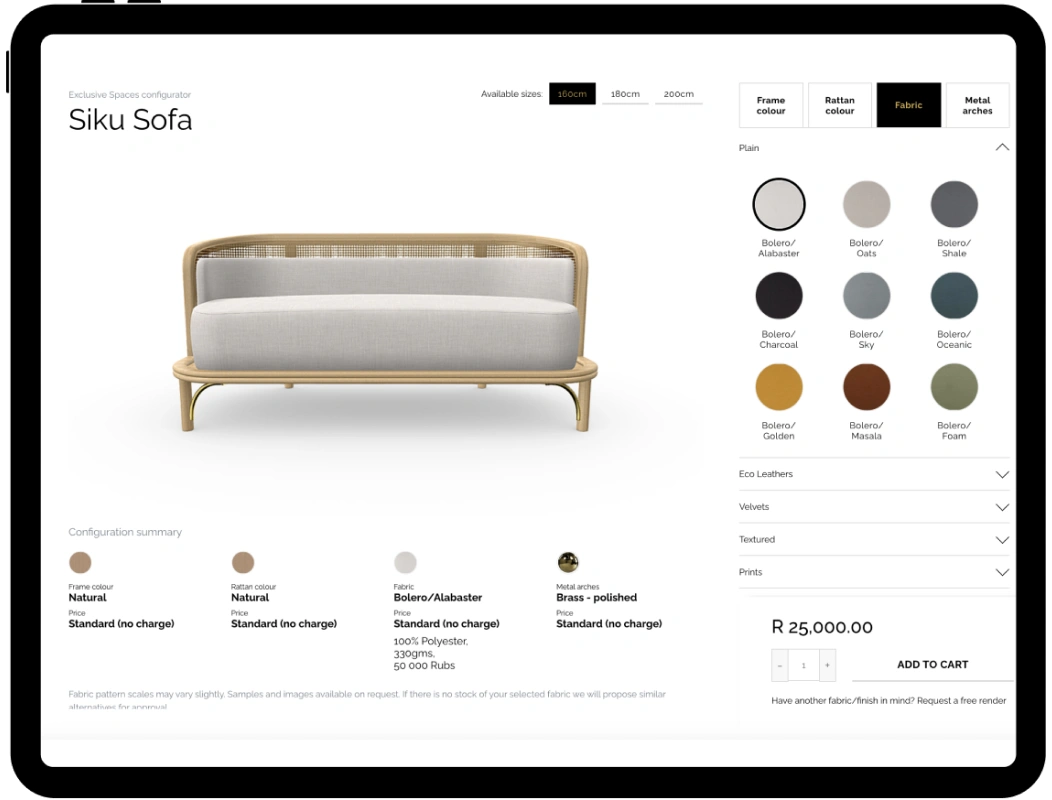
Instead of forcing Shopify to manage thousands of variant combinations, a parametric configurator acts as the “brain” outside of Shopify.
- Infinite Combinations: You can offer millions of configurations without hitting Shopify’s 2,048 limit because the logic lives externally.
- Visual Consistency: Systems like the Ar-range 3D Product Configurator generate photorealistic renders on the fly, bypassing Shopify’s 250-image limit.
- Synchronized Data: Pricing, dimensions, and restrictions are calculated in the configurator and passed to Shopify only when the “Add to Cart” button is clicked.
By moving the complexity to a dedicated rules engine, Shopify is allowed to do what it does best: handle the transaction.